All posts
Self-Hosted·7 min read·Updated 18 Sept 2026

Self-Hosted Google Photos Alternative: Immich vs PhotoPrism (2026 Guide)

Quick answer
The best self-hosted Google Photos alternative in 2026 is Immich: automatic phone backup, face recognition, search and shared albums on your own hardware, with v3.2.2 released on 15 September 2026. PhotoPrism is the better fit for organising an existing archive. Whichever you choose, keep a separate backup.

Replace Google Photos with Immich or PhotoPrism on your own hardware: features, what each is best at, hardware needs, and a backup plan so self-hosting does not cost you your photos.

Piyush Jangir
Verified author

Founder of StackPicks. Self-taught builder shipping open-source dev tools, marketing, and curator content since 2019. Based in Mumbai, India. Available on GitHub and LinkedIn.

7 min read
Self-Hosted Google Photos Alternative: Immich vs PhotoPrism (2026 Guide)

Short version: Immich is the self-hosted Google Photos replacement that actually feels like one: automatic phone backup, faces, search and sharing. It is mature and fast-moving, with v3.2.2 released on 15 September 2026. PhotoPrism suits people organising an existing archive on disk. Both are only as safe as your backups.
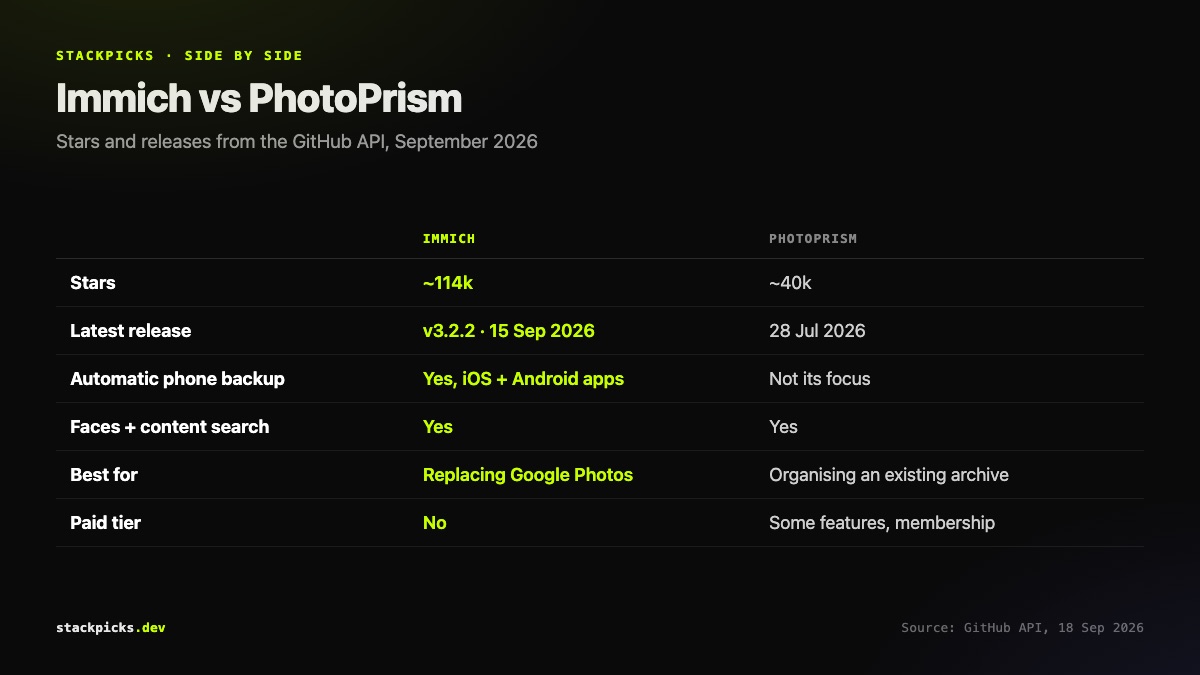
Immich vs PhotoPrism compared

Immich

Immich (about 114,000 GitHub stars, AGPL-3.0) is built to replace Google Photos on phones:

  • Automatic background backup from iOS and Android.
  • Face recognition and content search, running on your own hardware.
  • Albums, shared albums and a timeline that feels familiar.

It releases often, so read the release notes before upgrading.

PhotoPrism

PhotoPrism (about 40,000 stars) is built around an existing photo archive: indexing, tagging, browsing and search over folders you already have. Some features sit behind a paid membership, so check which ones before rolling it out to a family.

Hardware and storage

A small home server, NAS or mini PC works. Two things matter more than CPU:

  1. Storage.

- Plan for your library at least twice: once live, once as a backup.

  1. Memory for machine learning.

- Face recognition and search need more RAM than the core app.

Moving out of Google Photos
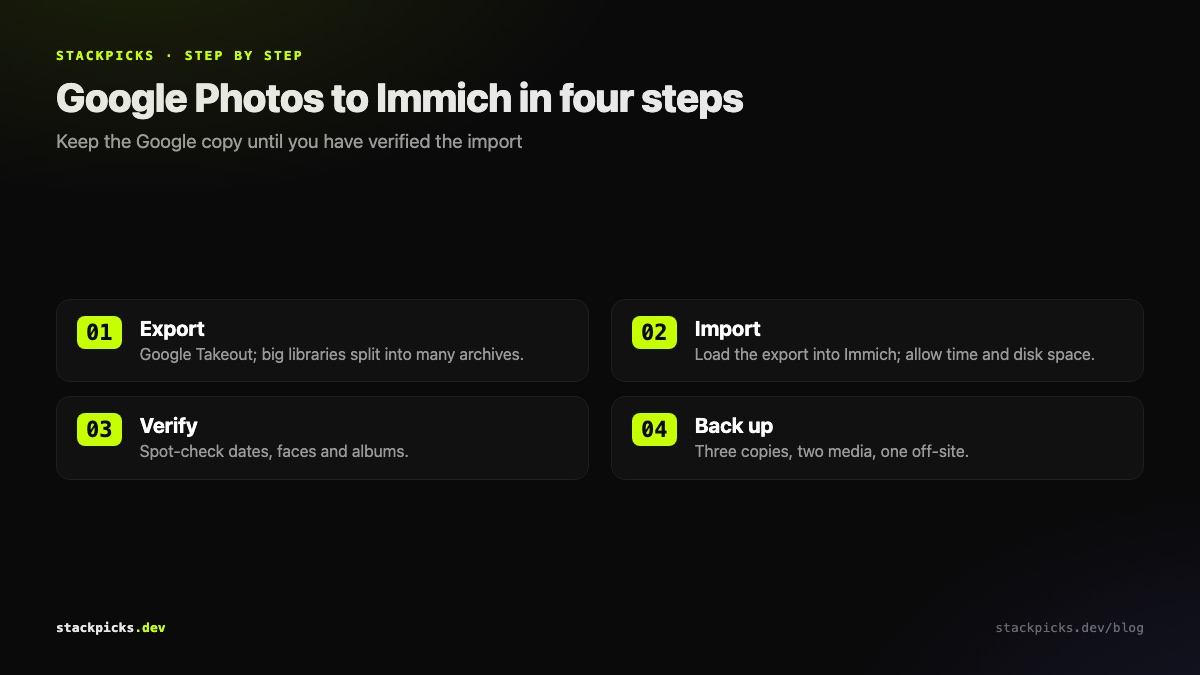
Moving from Google Photos to Immich in four steps

  1. Export with Google Takeout.

- Large libraries arrive as many archive files.

  1. Import into Immich.

- Use Immich's import tooling; allow time and disk space.

  1. Verify.

- Spot-check dates, faces and albums on a sample.

  1. Only then clean up Google.

- Keep the Google copy until the import is proven.

The backup rule

Three copies, two kinds of storage, one off-site. A single disk at home is one failure away from losing every photo. Our NAS guide covers the hardware side of doing this properly.

Frequently asked questions

Is Immich a full replacement for Google Photos?+

For most households, yes. Immich backs up iOS and Android phones automatically, recognises faces, searches by content, and supports albums and sharing, all on hardware you control. What you give up is Google's managed infrastructure: you are responsible for uptime, storage, upgrades and backups. It is a strong replacement if someone in the house is comfortable running a small server.

Immich or PhotoPrism: which should I choose?+

Immich if the main job is replacing Google Photos on phones: its mobile apps and automatic backup are its strength. PhotoPrism if you already have a large archive of photos on disk and want to browse, tag and organise it. Some people run both. PhotoPrism keeps some features in a paid membership; check which ones before choosing it for a family.

What hardware do I need to self-host Immich?+

A small home server, NAS or mini PC with enough storage for your library plus room to grow, and enough RAM for the machine-learning features that power face recognition and search. Very low-power boards can run the core app but struggle with those features. Storage is the real cost: plan for your current library at least twice over, once live and once as a backup.

How do I move my photos out of Google Photos?+

Use Google Takeout to export your library, then import it into Immich using its import tooling. Takeout exports can be very large and split across many archive files, and some metadata is exported in separate files alongside the images, so allow time and disk space. Keep your Google copy until you have verified the import.

Is self-hosting photos safe?+

It can be safer than a cloud service, or much less safe, depending entirely on your backups. A single disk in a single home is one failure away from losing everything. Follow the 3-2-1 idea: three copies, on two kinds of storage, one of them off-site. Treat Immich as the interface to your library, never as its only copy.

More in Self-Hosted

Self-Hosted Google Photos Alternative: Immich vs PhotoPrism (2026 Guide) — StackPicks — StackPicks