All posts
AI Engineering·9 min read·Updated 18 Sept 2026

Best Open-Source LLMs to Run Locally in 2026 (and the Tools to Run Them)

Quick answer
For most people in 2026, a Qwen3 model in the 8B to 30B range is the best local LLM: Apache-2.0 licensed, strong at coding and runs on a 16-32GB machine. OpenAI's gpt-oss and Microsoft's Phi-4-mini are good alternatives, the latter without a GPU. Run them with Ollama, and add Open WebUI for a chat interface.

Which open-weight models to run on your own machine in 2026 — Qwen3, gpt-oss, Gemma, Phi and more — what hardware each needs, and whether to use Ollama, llama.cpp, LM Studio or vLLM.

Piyush Jangir
Verified author

Founder of StackPicks. Self-taught builder shipping open-source dev tools, marketing, and curator content since 2019. Based in Mumbai, India. Available on GitHub and LinkedIn.

9 min read
Best Open-Source LLMs to Run Locally in 2026 (and the Tools to Run Them)

Short version: choose the model by the memory you have, not by leaderboard. On a 16-32GB machine, a Qwen3 model between 8B and 30B is the default recommendation in September 2026. Run it with Ollama and put Open WebUI in front of it. Licences differ between models, so check before you build anything commercial.
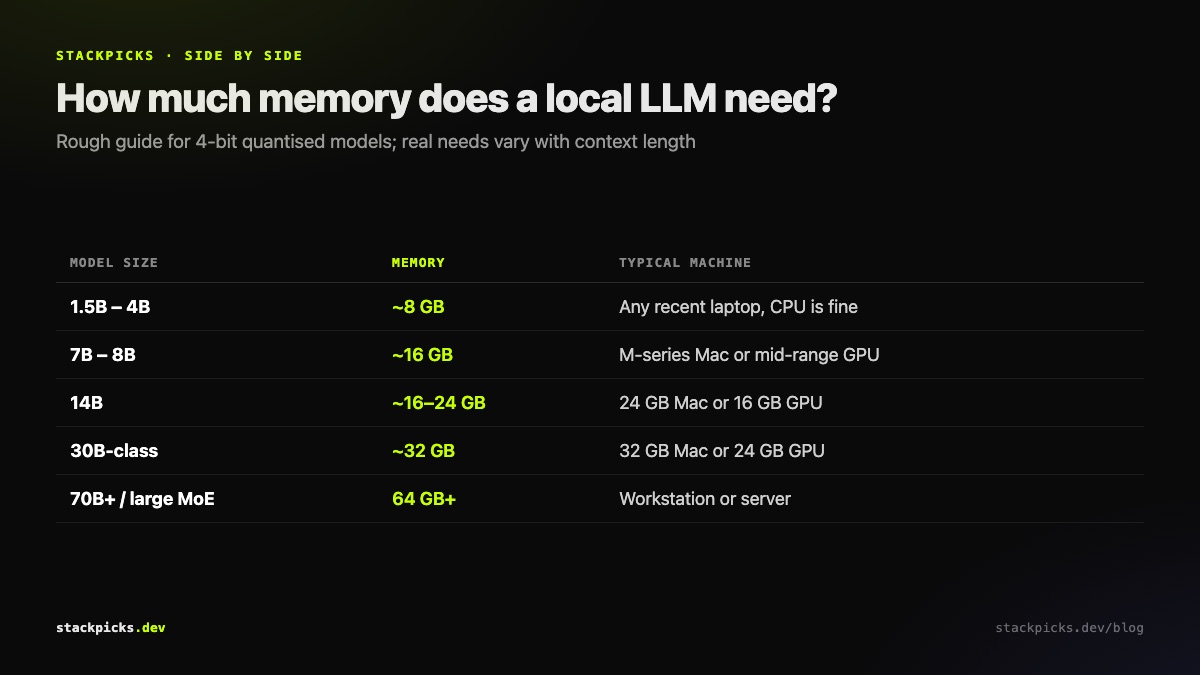
Rough memory needed per local model size, quantised

The models worth trying

Qwen3 family (Apache-2.0). Sizes from 1.7B up to 235B, which means there is a sensible size for almost any machine. The practical choice for most local users is the 8B, 14B or 30B range. Newer Qwen3.x releases continue the family.

gpt-oss (Apache-2.0). OpenAI's open-weight models. The smaller one is realistic on well-equipped desktops; the 120B version is for workstation-class hardware and is also offered on hosted services such as Antigravity's free tier.

Phi-4-mini (Microsoft). A small model that runs on the machine you already have, without a GPU. Good for scripts, summaries and quick questions.

Also in the 2026 field: Gemma 4 from Google, DeepSeek V4-Flash, Mistral Small 4, and very large releases such as Moonshot's Kimi K3, which needs server hardware rather than a laptop. Leaderboard positions change monthly; memory requirements do not.

The tools to run them
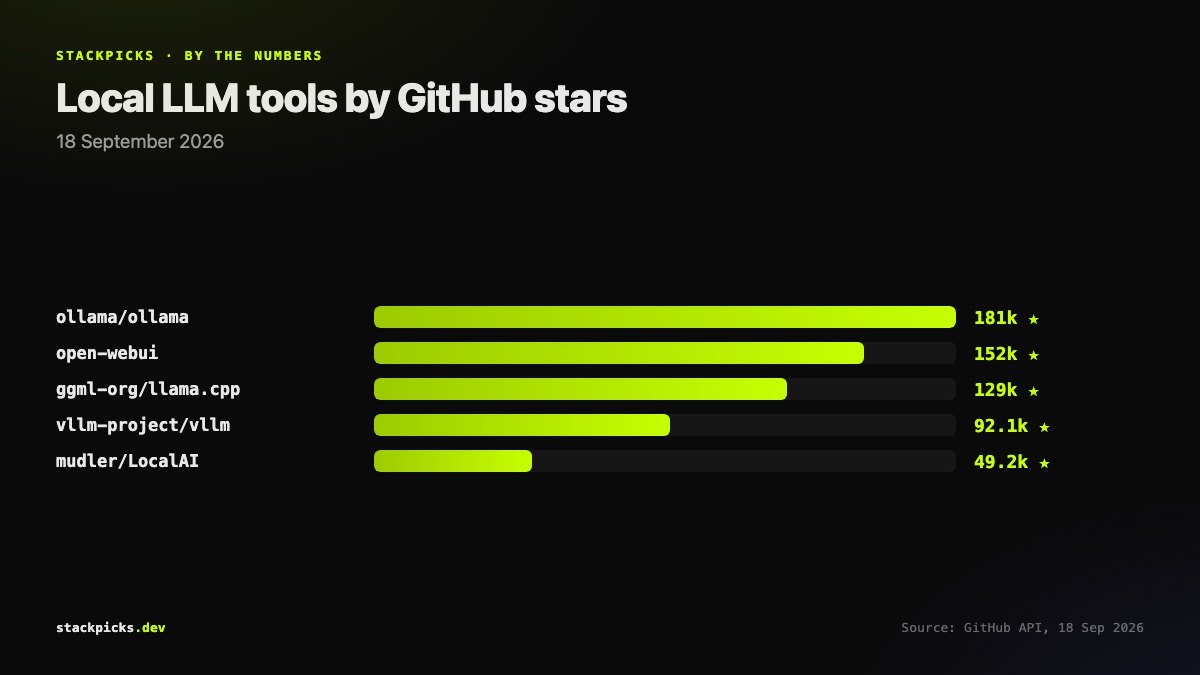
Local LLM runners by GitHub stars

  • **Ollama** is the easiest start: ollama run pulls and serves a model with an API other tools can call.
  • **llama.cpp** is the engine under much of the ecosystem, for maximum control.
  • LM Studio gives you a desktop app and model browser if you prefer a GUI.
  • **vLLM** is for serving many users on GPUs, built for throughput.
  • **Open WebUI** is the ChatGPT-style interface you put in front of any of them.

A sensible starting setup

  1. Install Ollama.

- Then pull a Qwen3 model sized for your RAM.

  1. Add Open WebUI.

- Point it at Ollama for a chat interface you can share.

  1. Connect your editor.

- Cline or Continue can use the same local model for coding help.

  1. Keep a hosted model for hard tasks.

- Local models still trail frontier models on large multi-file changes.

Our self-hosted LLM guide walks through that setup end to end.

Frequently asked questions

What is the best local LLM for coding?+

Among models that fit on ordinary hardware, the Qwen3 family is the most common recommendation for coding, under a permissive Apache-2.0 licence. Pick the largest size your memory allows, since quality climbs sharply with size. For complex multi-file agent work, local models still trail hosted frontier models, so many developers use local models for autocomplete and quick questions and a hosted model for larger tasks.

How much RAM do I need to run an LLM locally?+

As a rough guide for quantised models: about 8GB of memory handles a small 3-4B model, 16GB a 7-8B model comfortably, and 32GB or a 24GB GPU a model in the 30B range. Very large mixture-of-experts models need workstation or server hardware. Apple Silicon Macs work well because the GPU shares system memory, so unified RAM counts toward model size.

Ollama vs LM Studio vs llama.cpp: which should I use?+

Ollama is the easiest: one command to pull and run a model, with an API other tools can call. LM Studio offers a desktop app with a model browser, better if you prefer a GUI. llama.cpp is the engine underneath much of this ecosystem and gives the most control. For serving many users on GPUs, vLLM is built for throughput rather than a single desktop.

Are open-weight models free for commercial use?+

It depends on the licence, which varies by model. Qwen3 and gpt-oss use Apache-2.0, which allows commercial use. Others use custom licences with conditions, such as acceptable-use policies or restrictions above certain user counts. Read the licence on the model card before building a product on a model, not after.

Can I run a local LLM with no GPU?+

Yes, with small models. Microsoft's Phi-4-mini and small Qwen3 sizes run on a CPU with enough RAM, at slower speeds. Expect a few tokens per second on a typical laptop CPU, usable for short answers and scripts, slow for long generations. Any recent Apple Silicon Mac is a large step up, because its integrated GPU accelerates inference.

More in AI Engineering

Best Open-Source LLMs to Run Locally in 2026 (and the Tools to Run Them) — StackPicks — StackPicks