All posts
AI Engineering·8 min read·Updated 18 Sept 2026

Best Claude Code Skills on GitHub (2026): 12 Agent Skills Worth Installing

Quick answer
The most-used Claude Code skills on GitHub in 2026 are Anthropic's official anthropics/skills library, Addy Osmani's agent-skills, the token-saving caveman skill, claude-mem for memory across sessions, and design skills such as ui-ux-pro-max-skill. Skills use the open SKILL.md format, so most also work in Codex, Gemini CLI and Cursor.

The most-used Claude Code and Agent Skills on GitHub in 2026 — official libraries, token savers, memory and design skills — with star counts and how to install them.

Piyush Jangir
Verified author

Founder of StackPicks. Self-taught builder shipping open-source dev tools, marketing, and curator content since 2019. Based in Mumbai, India. Available on GitHub and LinkedIn.

8 min read
Best Claude Code Skills on GitHub (2026): 12 Agent Skills Worth Installing

Short version: start with Anthropic's official library and one of the curated indexes, then add a token saver and a memory skill. Star counts below come from the GitHub API on 18 September 2026. Popularity tells you what people install; it is not a security review, so read a skill's files before you add it.
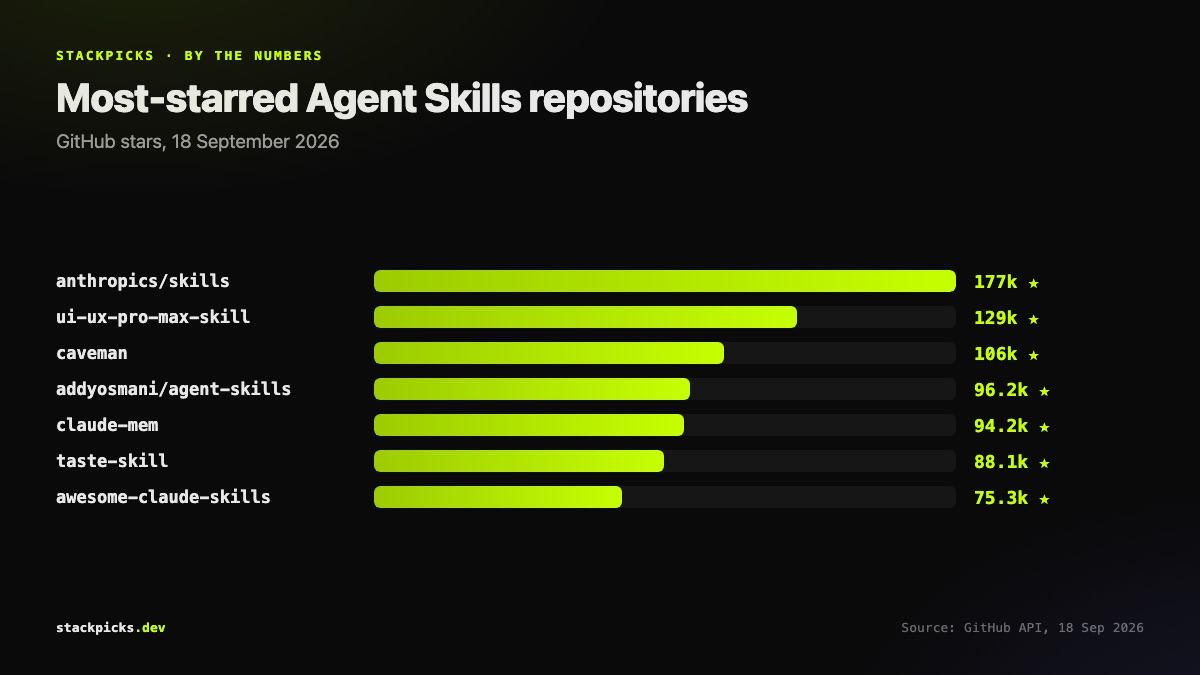
Most-starred Claude Code and Agent Skills repositories, September 2026

Official libraries

**anthropics/skills** is Anthropic's public repository of Agent Skills and the reference for how a good SKILL.md is structured. Read two or three before writing your own.

**addyosmani/agent-skills** is a set of production-grade engineering skills for coding agents, and the one people search for by name.

**google-labs-code/stitch-skills** pairs with Google's Stitch MCP server for UI generation.

Curated indexes

**ComposioHQ/awesome-claude-skills** and **VoltAgent/awesome-agent-skills** are the two big catalogues, the second collecting over 1,000 skills. Browse these before building something that already exists.

Token savers

**caveman** is built on one idea: fewer words, fewer tokens. **codeburn** is not a skill but a local tracker that tells you whether any of this is working.

Memory and planning

**claude-mem** captures what the agent learned so the next session does not start cold. **planning-with-files** keeps long tasks on track across context resets.

Design and behaviour

**ui-ux-pro-max-skill** and **taste-skill** both target the generic-looking interfaces agents tend to produce. **andrej-karpathy-skills** is a single CLAUDE.md distilled from Andrej Karpathy's coding guidance.

How to install a skill
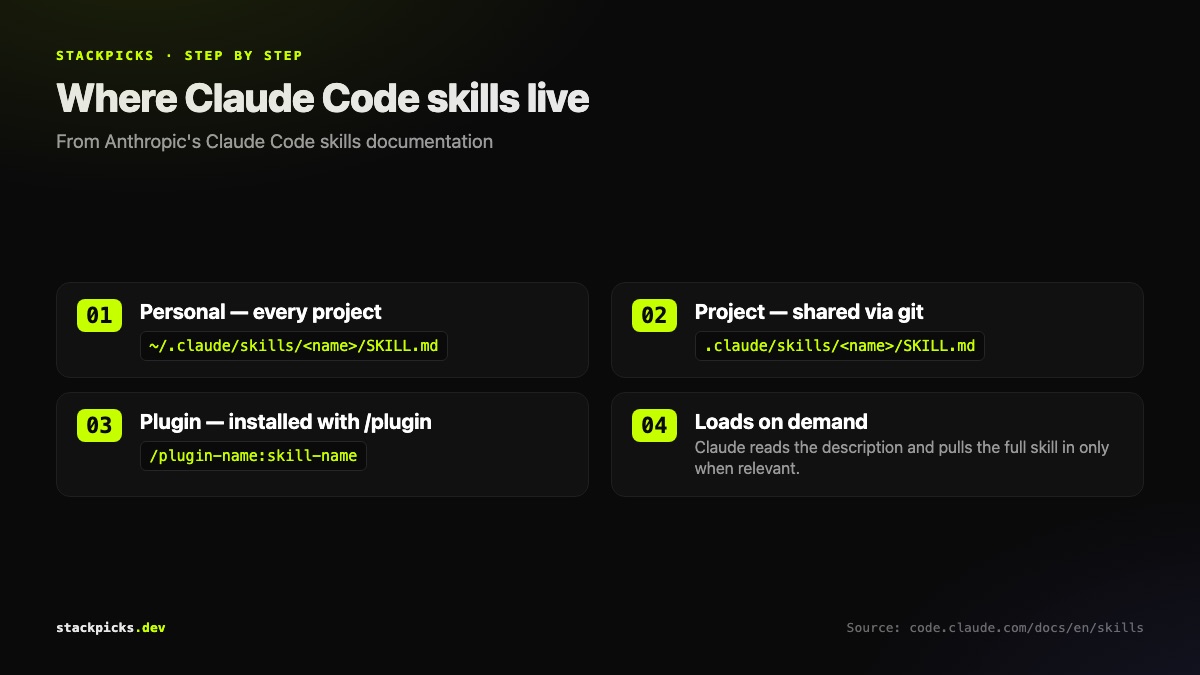
Where Claude Code skills live and how they load

  1. Pick the scope.

- Just you, every project: ~/.claude/skills/<name>/.

- The whole team, this repo: .claude/skills/<name>/.

  1. Copy the skill folder in.

- It must contain SKILL.md with frontmatter first.

  1. Check the description.

- Claude decides when to load a skill from its description.

  1. Invoke it or let it load.

- Run /skill-name, or let Claude pick it up when relevant.

Read before you run

Skills can ship scripts that execute on your machine. Open `SKILL.md` and every script before installing, and be wary of any skill asking for broad permissions through `allowed-tools`. The full, regularly updated list is in the Agent Skills directory.

Frequently asked questions

What is a Claude Code skill?+

A skill is a folder containing a SKILL.md file, with YAML frontmatter giving a name and description, followed by instructions, plus optional scripts and reference files. Claude reads the description and loads the full skill only when it is relevant to the task, or when you invoke it directly with /skill-name. That on-demand loading is why skills cost far less context than pasting the same instructions into every prompt.

Where do I install Claude Code skills?+

Personal skills go in ~/.claude/skills/<skill-name>/SKILL.md and load in every project on your machine. Project skills go in .claude/skills/<skill-name>/SKILL.md inside a repository and load for anyone working in it, which is how teams share them. Skills can also arrive bundled in plugins, installed with the /plugin command and invoked as /plugin-name:skill-name.

Do Claude Code skills work in other AI coding tools?+

Largely yes. Agent Skills is an open standard, published at agentskills.io, and Codex, Gemini CLI, GitHub Copilot, Cursor, VS Code, Goose and OpenCode all read SKILL.md. Skills built from instructions and plain scripts usually work unchanged. Anything relying on one tool's own features, such as Claude Code hooks or its specific frontmatter fields, may need small edits.

Are Claude Code skills safe to install?+

A skill can include scripts that run on your machine, so treat it like installing a package. Read the SKILL.md and any scripts before installing, prefer well-maintained repositories from identifiable authors, and be cautious with skills that request broad tool permissions through allowed-tools. Popularity is not a security review; a star count tells you people like something, not that it is safe.

How do I find more Claude skills?+

Start with curated indexes rather than raw GitHub search: ComposioHQ/awesome-claude-skills and VoltAgent/awesome-agent-skills each collect hundreds of skills sorted by use. The StackPicks Agent Skills directory lists the most-installed ones with a note on what each is for, marks recent additions as new, and links each to its source so you can read the files before installing anything.

More in AI Engineering

Best Claude Code Skills on GitHub (2026): 12 Agent Skills Worth Installing — StackPicks — StackPicks