All posts
AI Engineering·6 min read·Updated 18 Sept 2026

How to Use an MCP Server in VS Code (2026): mcp.json, Secrets and Agent Mode

Quick answer
To use an MCP server in VS Code, create .vscode/mcp.json with a "servers" object, add the server as type "stdio" with a command or type "http" with a URL, confirm the trust prompt when it starts, then use its tools from Copilot Chat. Use input variables instead of hardcoding API keys.

Set up MCP servers in VS Code with .vscode/mcp.json: stdio and HTTP examples, the "servers" root key, keeping API keys out of the file, user-level config and trust prompts.

Piyush Jangir
Verified author

Founder of StackPicks. Self-taught builder shipping open-source dev tools, marketing, and curator content since 2019. Based in Mumbai, India. Available on GitHub and LinkedIn.

6 min read
How to Use an MCP Server in VS Code (2026): mcp.json, Secrets and Agent Mode

**Short version:** VS Code reads MCP servers from `.vscode/mcp.json`, under a root key called `servers`. Local servers are `stdio` with a command; remote ones are `http` with a URL. You use their tools from Copilot Chat. The examples below follow the VS Code MCP documentation.
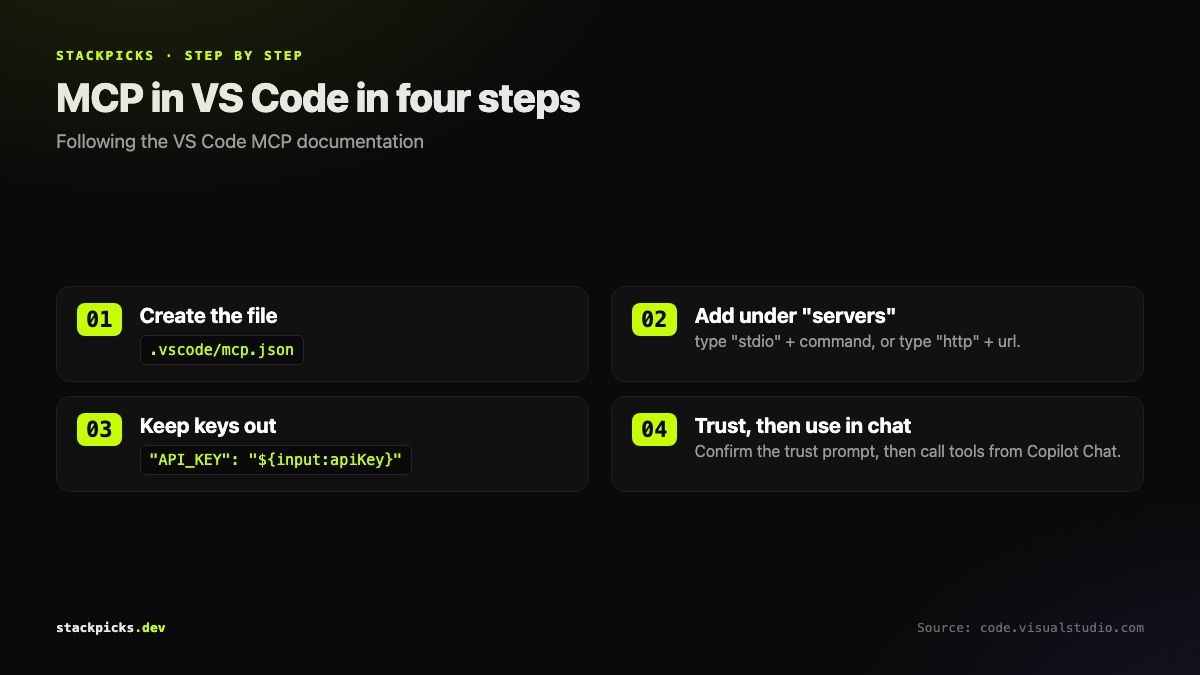
How VS Code loads an MCP server from .vscode/mcp.json

The one detail that breaks most setups

VS Code's root key is servers. Claude Desktop, Cursor and many READMEs use mcpServers. Paste a config from another tool without renaming the key and nothing loads, with no obvious error.

A local (stdio) server

{
  "servers": {
    "myServer": {
      "type": "stdio",
      "command": "npx",
      "args": ["-y", "@example/mcp-server"],
      "env": {}
    }
  }
}

A remote (HTTP) server

GitHub's official server is a good first one:

{
  "servers": {
    "github": {
      "type": "http",
      "url": "https://api.githubcopilot.com/mcp"
    }
  }
}

Keeping keys out of the file

.vscode/mcp.json is meant to be committed, so never hardcode a key in it. Reference an input variable instead and VS Code prompts for the value:

"env": { "API_KEY": "${input:apiKey}" }
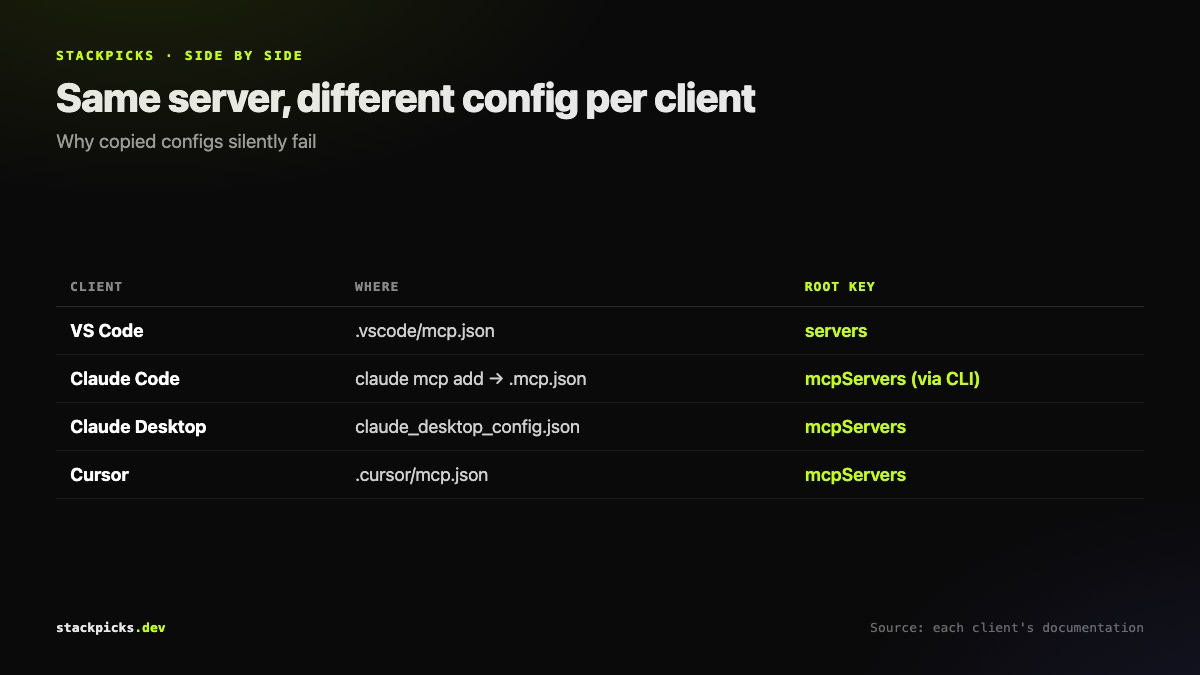
VS Code mcp.json vs Claude Code vs Claude Desktop config keys

Workspace or user level?

  1. Project tools: .vscode/mcp.json, committed, shared with the team.
  2. Personal tools: user configuration, opened with "MCP: Open User Configuration" from the Command Palette.
  3. First start: VS Code asks you to confirm you trust the server.
  4. Changed your mind: run "MCP: Reset Trust".

Using the tools

Open Copilot Chat and ask for something the server can do. Copilot Free includes a monthly allowance of chat requests, enough to try this without paying. If you also use Claude Code, the Claude Code MCP guide covers the equivalent commands, and our MCP directory has install details for 110 servers.

Frequently asked questions

Why is my VS Code mcp.json not working?+

Check the root key first. VS Code uses "servers", while Claude Desktop, Cursor and several other clients use "mcpServers", so configs copied from another tool's README often fail silently. Then check the type field: "stdio" for a local command and "http" for a remote URL. Finally, make sure you accepted the trust prompt the first time the server started.

How do I keep API keys out of .vscode/mcp.json?+

Use input variables. Reference a value as ${input:apiKey} in the server's env block and VS Code prompts for it rather than storing it in the file. That matters because .vscode/mcp.json is designed to be committed so the team shares the same servers. Hardcoding a key there is the most common way MCP credentials end up in a public repository.

Can I use MCP servers in every VS Code workspace?+

Yes. Define them in your user-level configuration instead of the workspace file. Open it from the Command Palette with "MCP: Open User Configuration". User-level servers are available in every workspace, while .vscode/mcp.json servers apply only to that project. A sensible split is personal tools at user level and project tools in the workspace file.

Do I need GitHub Copilot to use MCP in VS Code?+

MCP tools in VS Code are used through the chat interface, which is powered by GitHub Copilot, so you need Copilot access. The Copilot Free plan includes a monthly allowance of chat requests, so you can try MCP servers without paying, though heavy agent use will run through that allowance quickly.

How do I install an official MCP server in VS Code without writing JSON?+

Several vendors publish one-click installs. Atlassian, for example, documents installing its server by searching "@mcp Atlassian" in the Extensions view. Where no one-click option exists, the JSON takes a minute: copy the server's command or URL from its README into .vscode/mcp.json under the "servers" key.

More in AI Engineering

How to Use an MCP Server in VS Code (2026): mcp.json, Secrets and Agent Mode — StackPicks — StackPicks