All posts
AI Engineering·8 min read·Updated 18 Sept 2026

Best MCP Servers for Claude Code in 2026: 9 Picks With Install Commands

Quick answer
The best MCP servers for Claude Code in 2026 are GitHub's official server, Context7 for current library docs, Playwright and Chrome DevTools for the browser, CodeGraph for large codebases, and vendor servers for tools you use daily such as Atlassian, Notion and Stripe. Add each with claude mcp add and keep the list short.

The nine MCP servers worth connecting to Claude Code in 2026 — GitHub, Context7, Playwright, Chrome DevTools, CodeGraph and more — with verified install commands and scopes.

Piyush Jangir
Verified author

Founder of StackPicks. Self-taught builder shipping open-source dev tools, marketing, and curator content since 2019. Based in Mumbai, India. Available on GitHub and LinkedIn.

8 min read
Best MCP Servers for Claude Code in 2026: 9 Picks With Install Commands

Short version: connect a small set of servers you use every week, not every server you have heard of. For most developers that is GitHub, a docs server, a browser server and one or two tools from their own stack. Every install command below comes from the project's own README or from Anthropic's docs, checked in September 2026.
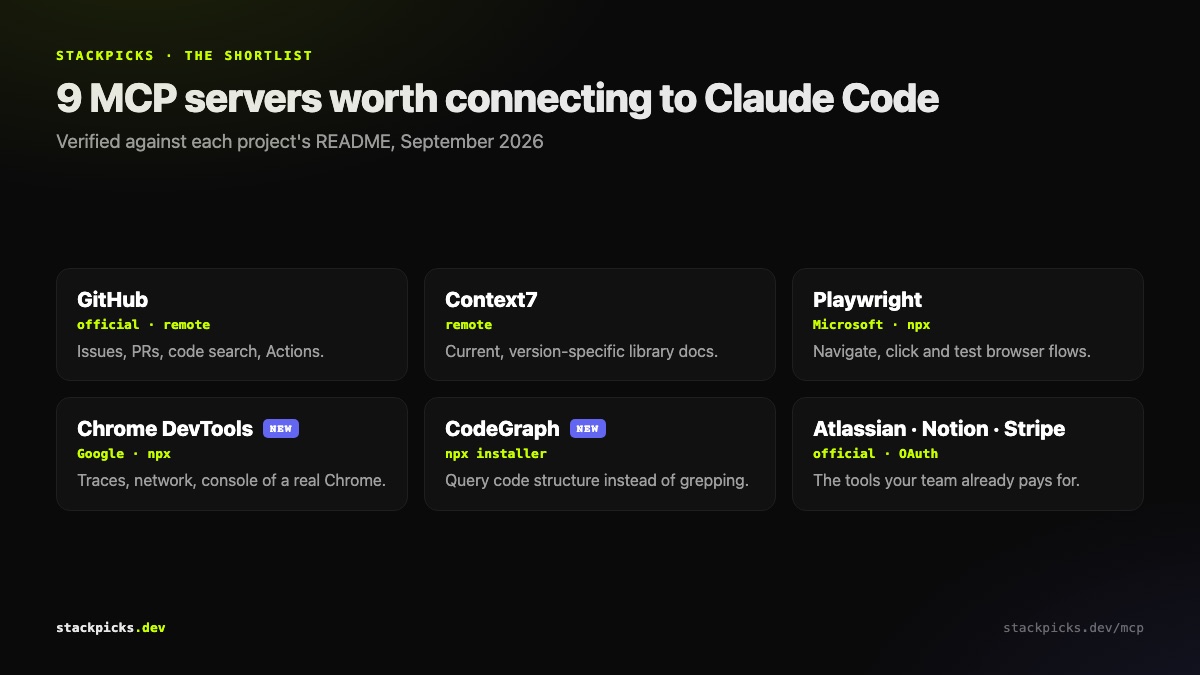
Nine MCP servers worth connecting to Claude Code in 2026

The core four

1. GitHub (official). Issues, pull requests, code search and Actions from inside the session. GitHub hosts a remote endpoint at https://api.githubcopilot.com/mcp/, or you can run it locally in Docker.

2. Context7. Pulls current, version-specific library documentation into context, which cuts the "that API was renamed two releases ago" mistakes. Remote endpoint: https://mcp.context7.com/mcp.

3. Playwright. Microsoft's browser automation server for navigating, clicking and testing flows: npx -y @playwright/mcp@latest.

4. Chrome DevTools. Google's server that drives a real Chrome and reads performance traces, network requests and the console, so the agent can see why a page broke: npx -y chrome-devtools-mcp@latest.

For large codebases

5. CodeGraph. A pre-indexed code knowledge graph served over MCP, so the agent queries structure instead of grepping. The installer is npx @colbymchenry/codegraph, then codegraph init in each project.

Tools you already pay for

6. Atlassian. Jira and Confluence over OAuth: https://mcp.atlassian.com/v2/mcp.

7. Notion. Pages and databases: https://mcp.notion.com/mcp.

8. Stripe. Payments data and actions: https://mcp.stripe.com.

9. Your database vendor's server. Use the official one, such as Supabase's, rather than the retired reference Postgres server.

How to add them
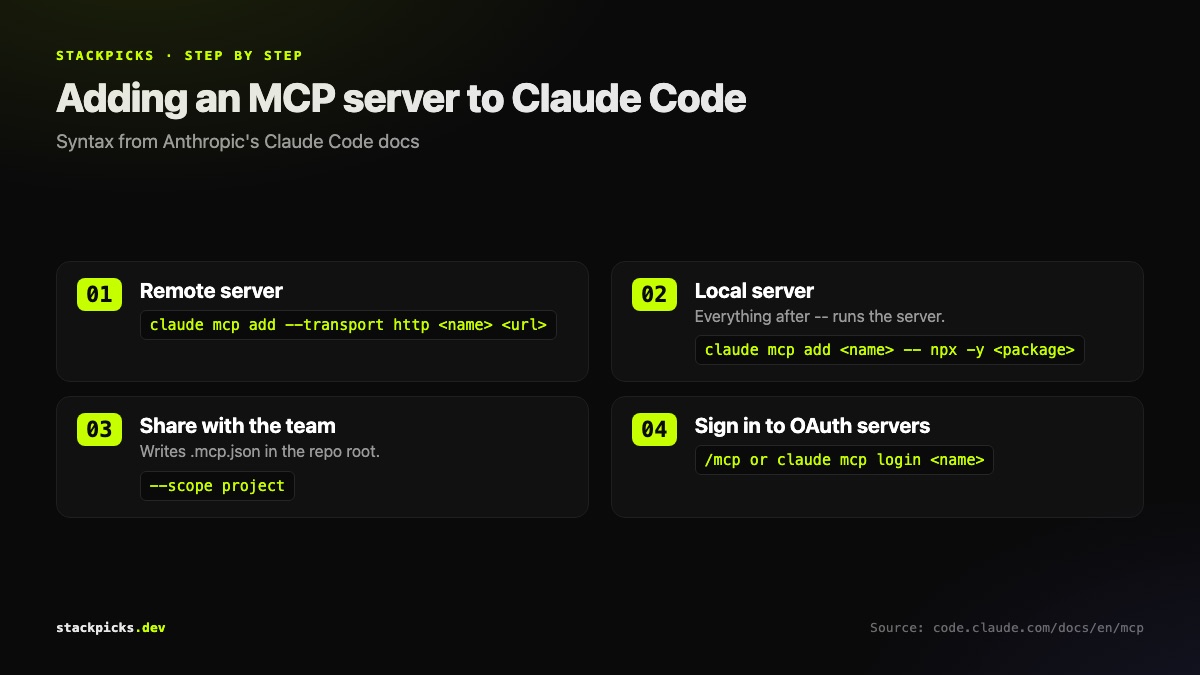
Adding MCP servers to Claude Code: remote, local, scoped, authenticated

claude mcp add --transport http context7 https://mcp.context7.com/mcp
claude mcp add chrome-devtools -- npx -y chrome-devtools-mcp@latest
claude mcp add --transport http --scope project atlassian https://mcp.atlassian.com/v2/mcp
claude mcp list

Use --scope project for servers the whole team needs; it writes them to .mcp.json in the repository. Authenticate OAuth servers from the /mcp panel inside a session.

What we left out, and why

The reference Postgres, SQLite, Brave Search, Slack, GitLab, Google Drive and Puppeteer servers were moved to the archived repository and are no longer maintained. Many "best MCP servers" lists still recommend them. We do not.

Keep the list short

Each server's tool definitions load into every request. Connecting everything is how people end up asking how to reduce Claude Code token usage. Browse the full MCP directory when you need something specific, and connect it only then.

Frequently asked questions

How do I add an MCP server to Claude Code?+

Use claude mcp add. For a remote server: claude mcp add --transport http <name> <url>. For a local one, put the server command after a double dash: claude mcp add <name> -- npx -y <package>. Environment variables go before the double dash with --env. Remote servers that use OAuth are authenticated from the /mcp panel inside a session, or with claude mcp login <name>.

What is the difference between local, project and user scope?+

Local scope, the default, loads the server only for you in the current project. Project scope writes it to .mcp.json in the repository root, so everyone who clones the repo gets it, which is how teams share servers. User scope loads it for you in every project. Put personal daily servers at user scope and team tools at project scope.

How many MCP servers should I connect?+

Fewer than most people think. Every connected server adds its tool definitions to the context of every request, whether you use them or not, so ten servers connected just in case is a permanent tax on tokens and on the model's attention. Connect what you use weekly, scope the rest to the projects that need them, and remove anything idle.

Are the old reference Postgres and Brave Search servers still recommended?+

No. The Postgres, SQLite, Brave Search, Slack, GitLab, Google Drive and Puppeteer reference servers were moved into the archived repository and are no longer maintained by the MCP team. For databases, use your vendor's official server, such as Supabase's, and for the browser, use Playwright or Chrome DevTools.

Are MCP servers safe to install?+

Treat them like any dependency with credentials. Check who publishes it, what it can reach and whether it is maintained. A browser server can access every page you load; a database server can run queries. Prefer vendor-published servers, give tokens the narrowest scope possible, and read the security checklist before connecting anything to production.

More in AI Engineering

Best MCP Servers for Claude Code in 2026: 9 Picks With Install Commands — StackPicks — StackPicks