All posts
AI Engineering·7 min read·Updated 18 Sept 2026

MCP Server for the Indian Stock Market: Zerodha Kite MCP Setup Guide (2026)

Quick answer
The official MCP server for Indian markets is Zerodha's kite-mcp-server. Add the hosted endpoint https://mcp.kite.trade/mcp to Claude, Cursor or VS Code and log in with Kite; no API key is needed. The hosted version covers quotes, holdings and positions but leaves out order placement, which only self-hosting enables.

How to connect Zerodha Kite to Claude, Cursor or VS Code with the official Kite MCP server: hosted vs self-hosted, which tools each exposes, and how to keep trading tools switched off.

Piyush Jangir
Verified author

Founder of StackPicks. Self-taught builder shipping open-source dev tools, marketing, and curator content since 2019. Based in Mumbai, India. Available on GitHub and LinkedIn.

7 min read
MCP Server for the Indian Stock Market: Zerodha Kite MCP Setup Guide (2026)

**Short version:** Zerodha publishes an official MCP server for Kite. The hosted endpoint, `https://mcp.kite.trade/mcp`, needs no API key and gives an AI assistant your quotes, holdings and positions. It deliberately leaves out order placement. Trading tools exist only if you self-host with your own Kite Connect credentials. Everything below is from the kite-mcp-server README, checked in September 2026.
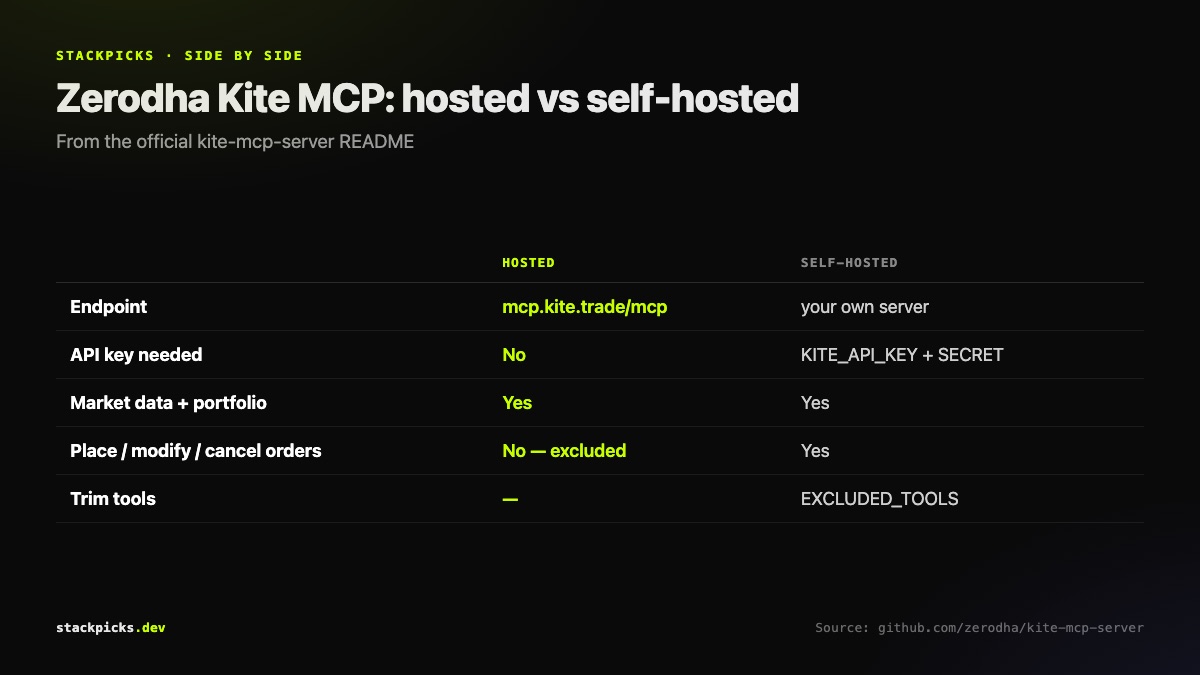
Zerodha Kite MCP: hosted endpoint vs self-hosted

Hosted or self-hosted?

Hosted (recommended to start): add https://mcp.kite.trade/mcp to your client and log in with Kite. The README says the hosted version excludes potentially destructive trading operations, so it is the safer way to try this.

Self-hosted: run the server yourself with your own KITE_API_KEY and KITE_API_SECRET. You get the order tools, and you can remove any you do not want with EXCLUDED_TOOLS. Building it needs Go 1.21 or later.

Connect it

  1. Claude Code:

- claude mcp add --transport http kite https://mcp.kite.trade/mcp

- Then run /mcp inside a session.

  1. Clients that only speak stdio:

- Use mcp-remote: command npx, args ["mcp-remote", "https://mcp.kite.trade/mcp"].

  1. Authorise:

- Ask the assistant to log in. The login tool generates a Kite authorisation link.

What you can ask it
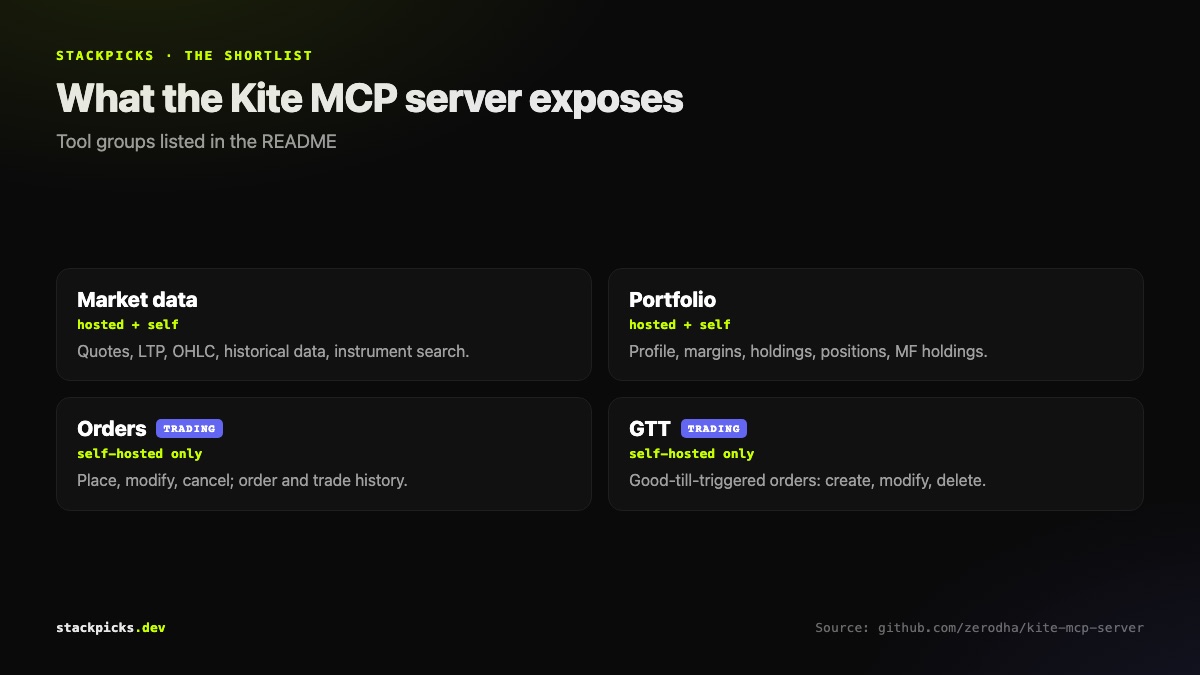
Tools exposed by the Zerodha Kite MCP server

  • Market data: "What is the last traded price of INFY and TCS?", historical candles, instrument search.
  • Portfolio: holdings, positions, margins and mutual fund holdings, summarised or compared.
  • Orders (self-hosted only): place, modify and cancel orders, plus GTT orders.

Guardrails worth keeping

Start hosted. If you self-host with trading on, exclude the tools you will not use, approve every order yourself, and never leave an agent running against a live account. An assistant misreading "sell half" is an expensive way to learn about prompt ambiguity. Read our MCP security checklist before connecting anything that touches money.

Zerodha's server now sits in the new Finance category of the MCP directory.

Frequently asked questions

Can the Zerodha Kite MCP server place trades?+

Only if you self-host it. The hosted endpoint at mcp.kite.trade excludes potentially destructive trading operations, so it covers market data and your portfolio but not order placement. The self-hosted server, running with your own Kite Connect API key and secret, exposes place, modify and cancel order tools plus GTT orders, and you can remove any of them with the EXCLUDED_TOOLS environment variable.

Is the Kite MCP server official?+

Yes. It is published by Zerodha in the zerodha/kite-mcp-server repository on GitHub under the MIT licence, and it runs on top of the Kite Connect API. Several community Zerodha MCP servers exist too, but most are small personal projects that have not been updated in months, so the official server is the one to use unless you need something it does not offer.

Do I need a Kite Connect API subscription?+

Not for the hosted endpoint. The README states that no installation or API keys are required on your end: you connect to mcp.kite.trade and authorise through the login tool. Self-hosting is different: it needs your own KITE_API_KEY and KITE_API_SECRET from a Kite Connect developer app, and Go 1.21 or later to build the server.

Which AI apps work with the Kite MCP server?+

Any MCP client. Claude Code and VS Code can connect to the HTTP endpoint directly. Clients that only support local stdio servers, such as older Claude Desktop configurations, connect through mcp-remote, and the README includes a ready-made config for that. Cursor, Windsurf and other clients work the same way, pointed at https://mcp.kite.trade/mcp.

Is it safe to connect my brokerage account to an AI assistant?+

Treat it as seriously as sharing your trading password. The hosted endpoint is the safer starting point because it leaves out order placement. If you self-host with trading enabled, remove the order tools you do not need with EXCLUDED_TOOLS, review every order the assistant proposes before approving it, and never let an agent act on your account unattended.

More in AI Engineering

MCP Server for the Indian Stock Market: Zerodha Kite MCP Setup Guide (2026) — StackPicks — StackPicks